
MBS Universal Gateway XT Series
Core + x-link
Two IP ranges. One data plane.
In many projects, automation and management systems are located in different network segments. Their data is intended to be shared, even though the systems are not connected to the same port.
The MBS Universal Gateway Core + x-link from the XT Series features two Ethernet ports as well as additional serial interfaces. It processes information from separate network structures within a single gateway platform. The central data point manager assigns the projected information to the respective target protocols.
Available now
Merging Data from Separate Network Segments
Core + x-link is designed for applications with two separate IP ranges. The planned version features two Ethernet, two RS485, and two RS232 interfaces. This allows both network and serial devices to be supported within a single gateway platform.
Communication is established using the protocols and data points configured for the project. The Data Point Manager provides the necessary information to the designated target systems. Addressing and data sharing between the participating departments are defined on a project-by-project basis.
Which model is right for your project?
The Universal Gateway Core + x-link is the right model when an x-link system needs to be physically connected directly to the gateway.
If only IP-based communication protocols such as BACnet/IP, Modbus TCP, MQTT, or OPC UA are used and no additional x-link connection is required, the Universal Gateway Core provides the ideal foundation.
If another bus system is to be connected directly in addition to x-link, a corresponding combined Core + version is required, depending on the available device model.
Technical Basis of the XT Series
The Universal Gateway Core + x-link is based on the new XT Series hardware platform. A more powerful CPU and expanded main memory provide additional capacity for demanding integration tasks. A completely redesigned web interface is also available to simplify configuration and commissioning.
The new hardware also enhances the gateway's security architecture. At its core is an integrated secure element. It provides the technical foundation for a secure boot process that can detect tampering with the bootloader or kernel.
Digital certificates can be securely stored in the Secure Element. It also provides the foundation for encrypting the entire file system on the SD card. This allows both the system and customer-specific user and configuration data to be stored in encrypted form.
Configuration and Commissioning
The web interface allows you to configure and analyze the gateway. This includes, among other things, setting network parameters, creating and managing data points, and mapping information between x-link and other communication protocols.
The appropriate GSD file is provided for integrating the gateway into the x-link configuration.
A REST API also makes it possible to automatically configure settings from external applications. This is particularly relevant for OEM applications and recurring device configurations.
Important Note:
Please ensure that your gateway has been configured for the specific application before commissioning.
Three Steps to Your Gateway
Define Systems and Interfaces
Specify which x-link system should be connected and with which building automation, energy, or IT systems data should be exchanged.Determine Data Point Capacity
Determine how much information needs to be transferred between the systems involved. Then select the appropriate data point package.Configuring Protocols
Determine which additional communication protocols are required and how data should be mapped between x-link and the respective target systems.
Your gateway thus consists of the Core + x-link device model, the required data point capacity, and the planned communication protocols.
Made in Germany
The XT Series circuit boards are manufactured in Europe. Final assembly takes place at the MBS facility in Krefeld.
MBS develops its own gateway platform and supports projects from selection and planning through commissioning to long-term support.
Downloads and Technical Documentation
Item Number: 11-0096
Data Sheet: Technical Specifications, Dimensions, Interfaces, and Environmental Conditions. ›
DE | EN
Quick Start Guide
Instructions for installation, connection, and initial setup. ›
ManualDetailed information on project planning, configuration, and operation will be available shortly. ›
Firmware Updates
Latest firmware and installation instructions. ›
RFP Text
Product description for planning and bidding. ›
FAQ and Help CenterAnswers to questions about configuration, operation, and technical issues will be available shortly. ›




Technical data
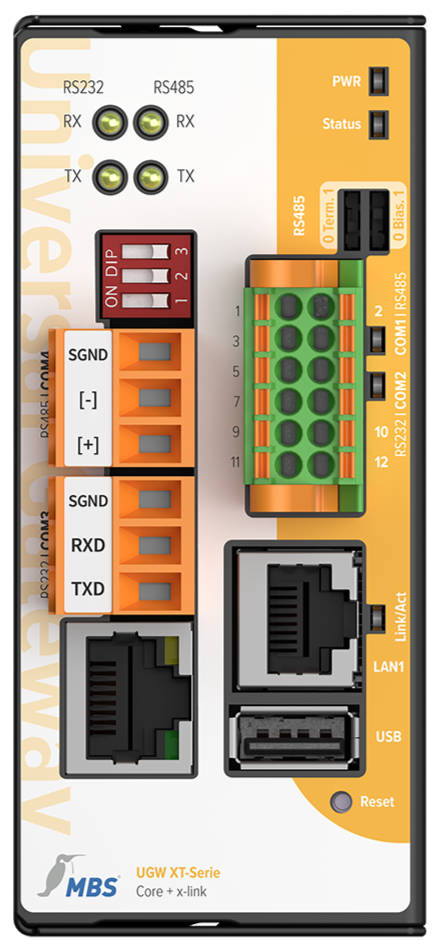
LEDs
Power: Lights up as soon as the device is connected to a suitable
power supply
ST.: Multicolor status LED
DIP switches
Terminating resistor: 120 Ω
Bias: Standby voltage for RS485 interface
PWR - Power
VCC IN: 12 to 24 V DC power supply
GND IN: Ground connection to the power supply
COM1 | RS485
[+]: non-inverted line
[-]: inverted line
SGND: signal ground connection
COM2 | RS232
TX: Transmit line
RX: Receive line
SGND: Signal ground
Interface LEDs
Flash blue when the device is sending data
Flash green when the device is receiving data
LAN
RJ45: 10/100 Mbit/s Ethernet
LED:
Lights up when a link is present
Flashes during data traffic
USB
Not used
, 5 V, max. 500 mA
x-link
COM3 | RS232
TXD: Transmit line
RXD: Receive line
SGND: Signal ground connection
COM4 | RS485
[+]: non-inverted line
[-]: inverted line
SGND: signal ground connection
LAN
RJ45: 10/100 Mbit/s Ethernet
LED:
Lights up when a link is present
Flashes during data transmission
DIP switches
Bias: Voltage for RS485 interface Terminating resistor: 120 ohms
Specifications:
Power consumption: 2 W
Weight: 410 g
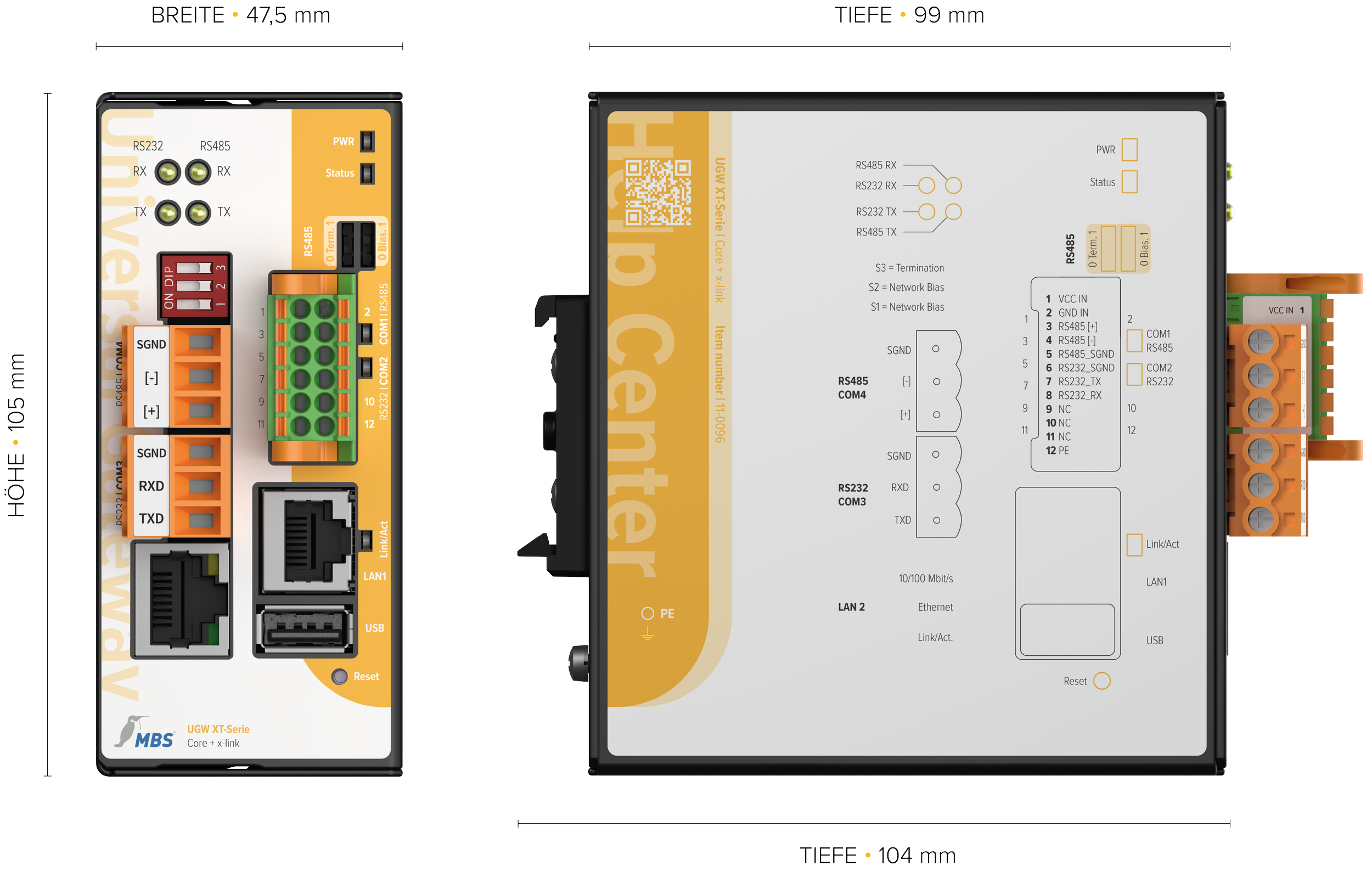
Dimensions: Height : 105 mm, Width: 47.5 mm, Depth: 99 mm
(Depth: 104 mm including DIN top-hat rail mount)
Ambient temperature: 0 to 45 °C
Ambient humidity: 20 to 80% relative humidity, non-condensing
Protection class: IP20
Mounting: TS35DIN top-hatrail per EN 60715
Frequently Asked Questions About the XT Series Universal Gateway Core + x-link
-
No. Which data can be used between the systems depends on the configured protocols, data points, and network settings.
-
When two Ethernet ports or additional serial interfaces are required. The Core includes only the basic ports of the XT platform.
Would you like to use the Universal Gateway Core + x-link in your project?
Are you already familiar with the systems involved, the communication protocols, and the approximate number of data points?Configure the appropriate Universal Gateway ›
Are you still unsure about the configuration, or do you need a specific quote?
Request a consultation or quote ›
Phone: +49 2151 7294-0
Email: vertrieb@mbs-solutions.de